Microsoft is officially retiring its iconic Blue Screen of Death (BSOD) after nearly four decades, with a sleek, black screen of failure ushering in a new era for Windows diagnostics.
What’s Changing?
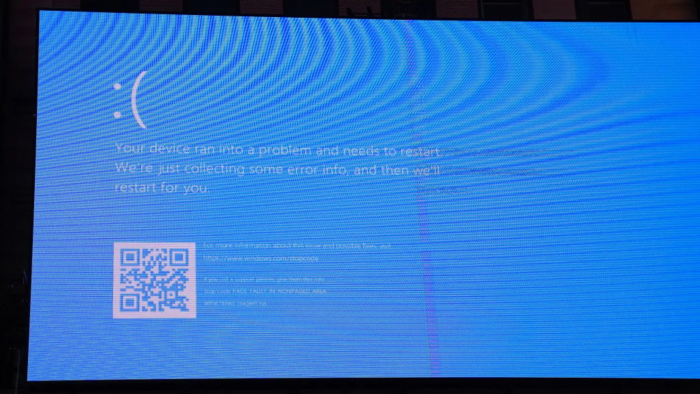
Microsoft confirmed that Windows 11’s dreaded crash screen—historically bright blue with a frowning face and QR code—will soon be replaced with a simplified black screen.
It will display only:
- A short message: “Your device ran into a problem and needs to restart.”
- A progress indicator (percentage complete)
- A stop code and the name of the faulty driver or system file
- No QR code, no emoticon, no clutter
The update is scheduled to roll out in Windows 11 version 24H2, likely later this summer, alongside Microsoft’s new Quick Machine Recovery feature.
Why the Change?
According to Microsoft, the shift is part of a broader Windows Resiliency Initiative, prompted by last year’s widespread crash incident during a faulty CrowdStrike update.
The goal:
- Streamline recovery—users get clearer info about errors, cutting through the complexity.
- Reduce fear and confusion—a less intimidating screen invites quick understanding.
- Align with modern Windows UI design, matching update screens with a cleaner aesthetic.
What’s Different Technically
- The dreaded frowning face and QR code—introduced in Windows 8 and expanded in Windows 10—will be removed.
- The UI now resembles a standard update screen, with percentage progress visible.
- All critical debugging info—stop code and failing driver—bears down at the bottom.
- Windows Insider builds briefly trialed a green BSOD, but the public release will be black.
Reactions & Implications
The redesign has sparked mixed responses:
- Supporters appreciate the move toward clarity and aesthetics.
- Critics argue that the new screen may obscure urgency—after all, blue was a clear sign of disaster.
From a practical standpoint, removing the QR code may leave some casual users without quick access to troubleshooting steps. However, IT admins will benefit from visible stop codes without needing crash-dump tools like WinDbg.
The Bigger Picture
This update is more than cosmetic. It reflects Microsoft’s push for:
- Robust error handling through Quick Machine Recovery
- Improved kernel hygiene under its Virus Initiative 3.0
- Consistency in user experience across Windows, blending crash screens with overall design trends
What You Should Know
| Feature | Old BSOD | New Black Screen |
| Background Color | Bright Blue | Black |
| Emoticon & QR Code | Present | Removed |
| Message Length | Wordy | Concise |
| Visibility | Eye-catching | Subdued |
| Debug Info | Hidden/crash dump needed | Visible error codes |
Rolling out later this summer on Windows 11 version 24H2, this hidden update aligns Microsoft with a more refined, resilient, and user-friendly operating system.
Final Take
After nearly 40 years, Microsoft's BSOD gets a modern makeover—better aligning with Windows 11’s sleek design and focusing on clarity and recovery. For power users and IT pros, though, the nostalgia of the classic “blue screen” might be the real casualty here.
Post Comment
Be the first to post comment!