MagicLight AI is a text-to-video and animation platform that converts prompts or scripts into professional-looking videos with consistent characters and styles. According to magiclight.ai, the tool supports projects ranging from short clips to 30–50 minutes, making it ideal for storytellers, educators, and marketers who want polished content without the complexity of traditional video editing.
Its mission is clear: give creators a faster, more affordable way to produce engaging animations.
Why MagicLight AI Matters
The biggest appeal of MagicLight AI is that it removes the need for advanced animation or editing skills. Instead of spending weeks in production, you write a script and let the AI handle storyboarding, character animation, and transitions.
In a Medium review, a creator highlighted how much faster it was to produce educational explainers compared to manual editing. That makes it particularly valuable for teachers, trainers, and solo creators working under tight deadlines.
Core Features Explained
- Script-to-Video
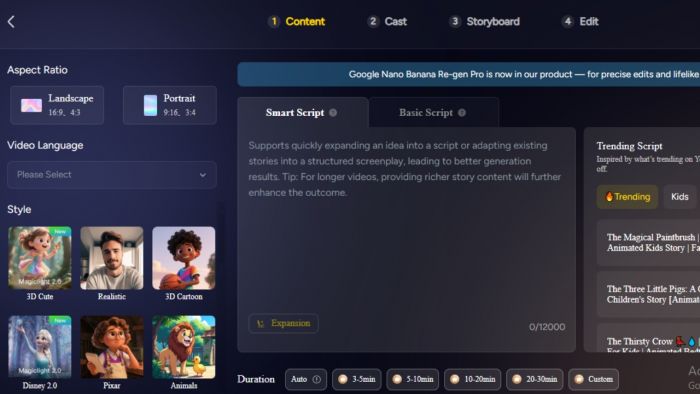
With the “story to video” tool, you can turn a text prompt into a complete animated sequence instantly. - Consistent Characters & Styles
One of its most praised features is consistent character design across scenes. Whether you choose anime, cartoon, or realistic art styles, the characters maintain their look throughout the video. - Long-Form Video Support
Unlike most AI video apps that limit clips to a few minutes, MagicLight supports up to 30 minutes on mobile and nearly 50 minutes via its web app, as confirmed on its Google Play Store listing. - Voiceovers in Multiple Languages
MagicLight also includes multilingual narration with accurate lip sync. Reviews in the app store note that users successfully created narrations in Spanish and Hindi, which is especially useful for global audiences.
Pricing Overview
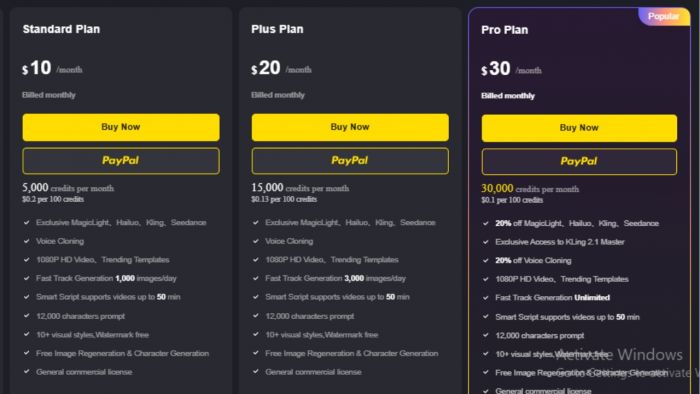
MagicLight AI offers four subscription tiers, starting with a free plan and scaling up for power users:
| Plan | Price | Credits | Video Length | Key Features |
|---|---|---|---|---|
| Free | $0 | – | 1 min | 3,000-character prompts, 10+ styles, watermark-free, commercial license |
| Standard | $10/mo | 5,000 | Up to 50 min | Voice cloning, 1080p HD, trending templates, 1,000 images/day |
| Plus | $20/mo | 15,000 | Up to 50 min | Faster generation (3,000 images/day), all Standard features |
| Pro | $30/mo | 30,000 | Up to 50 min | Unlimited generation, Kling 2.1 Master access, 20% off premium tools |
💡 Payment-related issues can be reported directly through Discord or Telegram, as noted in their official support channels.
How to Use MagicLight AI
Here’s a quick workflow example:
- Sign up at magiclight.ai.
- Select “Story to Video.”
- Paste your script, such as:
“A young girl builds a flying robot in a futuristic city at sunset. Animation style: anime. Narration: female voice, English.” - Pick your visual style and customize character details.
- Generate and refine your storyboard.
- Export your finished video.
This process makes it easy to turn ideas into fully animated clips in minutes.
User Feedback: The Good and the Bad
Customer reviews of MagicLight AI show both enthusiasm and frustration.
- On Medium, Solo creators described it as “good enough and insanely useful,” especially for those without animation backgrounds. They praised the speed of transforming scripts into shareable videos.
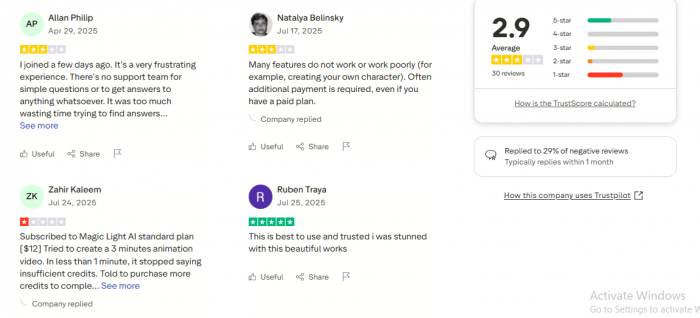
- On Trustpilot: Some users reported issues with hidden costs. Advanced features consumed credits quickly, leaving them frustrated. Others mentioned subscription cancellation challenges and slow customer support responses.
- On Google Play: Mobile users loved the convenience of creating videos on the go. But several reviews flagged problems with rendering longer projects — videos over 20 minutes sometimes failed or took much longer than expected.
- On Reddit and creative forums: Discussions showed a divide. Some praised its ability to keep characters consistent across long scripts, while others felt outputs still lacked the polish of studio-grade animations.
In short, MagicLight works best for solo creators, educators, and experimenters who prioritize speed and accessibility. But for businesses needing predictable production schedules, the credit system and support issues may be limiting.
Final Verdict
MagicLight AI is a strong choice for creators who want to tell stories visually without animation expertise. It excels at character consistency, long-form content, and multilingual narration. But its downsides include confusing credit usage, billing issues, and occasional rendering bugs.
If you’re a teacher, solo creator, or someone experimenting with AI video, MagicLight is a practical tool worth testing. Start with the free plan, and upgrade only if it fits your workflow. For professional studios, keeping options like Synthesia and InVideo in mind may be safer.
Post Comment
Be the first to post comment!