Trying to download something from Instagram sometimes feels like asking a vending machine for change. You press the button, you wait patiently, and occasionally something completely different drops out.
Instagram itself makes scrolling easy but saving content surprisingly difficult. Reels, stories, and photos can be shared, bookmarked, and liked, but downloading them directly usually requires screen recordings or screenshots that reduce quality.
Tools like Indown.io exist to simplify that process. The website includes several utilities designed to retrieve Instagram content through pasted links. According to the site layout, users can access sections related to reels, stories, highlights, posts, photos, and profile pictures.
However, once the platform is actually tested, the results show that the experience is a little different from what the navigation menu suggests.
What Indown.io Includes on Its Website
Indown.io is a browser-based Instagram media tool that works by processing public Instagram links. Instead of requiring installation or login credentials, the site asks users to paste a link into an input box.
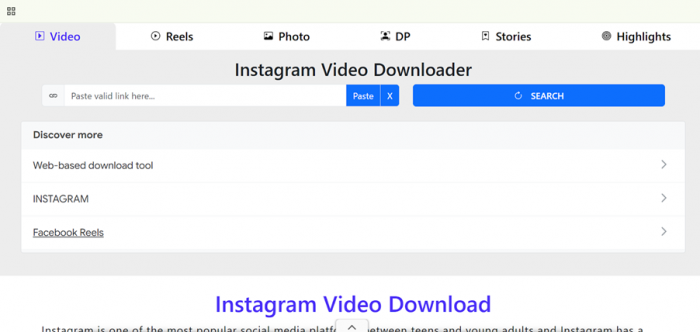
The website structure includes multiple sections designed for different types of Instagram content. These pages appear to target reels, photos, stories, highlights, and profile pictures. Each section explains that users can paste an Instagram link to retrieve the corresponding media.
Another noticeable aspect is that the platform does not request Instagram login information. This reduces the privacy concerns that sometimes appear with third-party downloader tools.
Because the entire tool runs inside a browser, it can be accessed from desktops, laptops, phones, or tablets without installing software.
Indown.io Overview
| Attribute | Details |
| Tool | Indown.io |
| Category | Instagram media downloader |
| Platform | Web-based |
| Login Required | No |
| Content Types Listed | Reels, Stories, Photos, Highlights, Profile Pictures |
| Access Method | Paste public Instagram link |
The structure suggests several download utilities, although hands-on testing shows that the behavior is more consistent in one specific area.
Hands-On Experience: What Actually Happens
Opening the homepage shows a minimal interface with a single input field asking for an Instagram link. The process is straightforward: copy a link from Instagram, paste it into the field, and let the site process it.
Testing included multiple types of Instagram links such as reels, standard posts, stories, highlights, and profile pages. Each link was entered into the site to see how the tool would handle different media types.
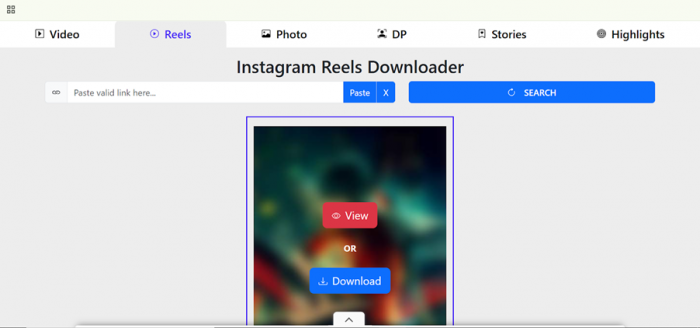
Interestingly, the result remained the same regardless of which type of content link was used. Instead of retrieving the expected media from reels, posts, or stories, the site consistently displayed the profile picture associated with the Instagram account in the link.
In other words, whether the link came from a reel, a story, or a post, the output typically showed the profile image of the account rather than the specific content from that link.
Website Options vs Actual Behavior During Testing
| Content Type Entered | Section Exists on Website | Result During Testing |
| Reels | Yes | Returned the profile picture instead |
| Posts | Yes | Returned the profile picture instead |
| Stories | Yes | Returned the profile picture instead |
| Highlights | Yes | Returned the profile picture instead |
| Profile Picture | Yes | Correctly displayed and downloadable |
This makes the profile picture viewer the most predictable and consistent part of the tool during testing.
Where Indown.io Still Has Practical Value
Even though several content categories appear on the website, the platform works most reliably when used to view Instagram profile pictures.
Instagram typically shows profile images in a small circular format that can be difficult to inspect clearly. Tools like Indown.io allow users to view the image in a larger resolution by entering a profile link.
For social media researchers, marketers, or users examining branding elements, viewing a profile picture in full resolution can be useful. The process is quick and does not require installation or account access.

Other sections of the site may behave differently depending on the link or current platform behavior, but based on testing, the profile picture viewer remains the most consistent feature available.
Situations Where the Tool Can Help
• Viewing Instagram profile pictures
• Saving public profile images quickly
• Using a browser-based tool without installing apps
• Accessing a simple interface on mobile or desktop
These focused use cases still make the platform useful in specific scenarios.
Final Thoughts
Indown.io includes several pages related to downloading different types of Instagram content through pasted links. The website structure lists reels, stories, highlights, posts, photos, and profile pictures as available categories.
However, real-world testing shows that the tool currently behaves most consistently as a profile picture viewer and downloader. Other content types often return the account’s profile image instead of the specific media from the link.
That does not necessarily reduce the usefulness of the tool. For users who simply want to view and save Instagram profile pictures in higher resolution, the platform works quickly and requires almost no setup.
For downloading reels, stories, or highlights, users may explore additional tools depending on their needs.
FAQs
What is Indown.io used for?
Indown.io is a web-based tool that includes utilities designed to retrieve public Instagram content through pasted links.
Do you need to log into Instagram to use Indown.io?
No. The platform works without requiring Instagram login credentials.
Can Indown.io download Instagram reels?
The website includes a section for reels, but during testing the tool often displayed the profile picture of the account instead of the reel itself.
What feature works best on Indown.io?
The profile picture viewer works most consistently and allows users to view and download Instagram profile images in higher resolution.
Is Indown.io safe to use?
The tool does not request account login information, which reduces privacy risks. Users should still download only public content and avoid sharing personal information on third-party sites.
Post Comment
Be the first to post comment!