On This Page
Over the past week, I’ve been testing NoteGPT AI intensively, not just clicking through features, but actually using it in my daily workflow with real lectures, PDFs, images, and audio recordings.
What follows is an honest, first-person, experience-based deep-dive into how NoteGPT AI actually performs, where it falls short, and who it’s truly built for.
My Initial Impression: A Tool With Ambition, Maybe Too Much
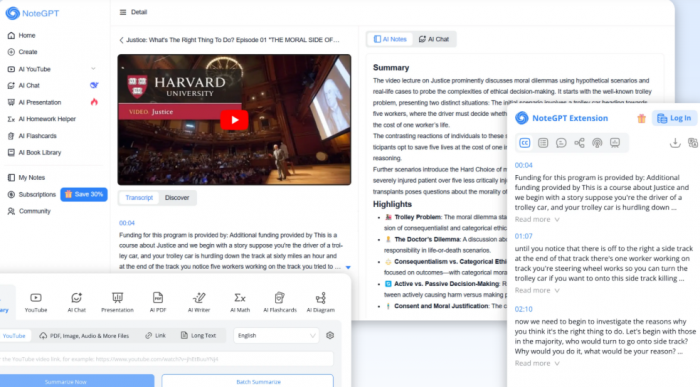
When I first landed on the NoteGPT AI homepage, the interface didn’t feel like a simple summarizer at all.
It felt like a full AI ecosystem, almost chaotic:
- AI YouTube
- Presentation
- Study
- Writer
- AI Tools
- Pricing
Every dropdown expanded into another dense list of tools.
My honest reaction was:
“This is either incredibly powerful… or incredibly confusing.”
The screenshots you sent match my experience, dozens of tools across multiple categories.
NoteGPT AI clearly tries to be:
- a summarizer
- a study tool
- a writer
- a PPT maker
- a worksheet generator
- a math solver
- a diagram generator
- a transcription tool
- an AI chat assistant
…all at the same time.
This breadth is both its biggest strength and its weakest flaw.
The Navigation Experience: Useful but Overcrowded
Let me break down my actual thought process as I navigated.
The Menu System
Every time I clicked a new menu, I found myself saying:
“Wait, another 15 tools? What’s the difference between these?”
Under Study alone:
- Ask AI
- Flashcard Maker
- Quiz Generator
- Study Guide Maker
- Graphing Calculator
- Physics Solver
- Chemistry Solver
…and more.
Under Writer:
- Humanizer
- Essay Writer
- Story Generator
- APA Citation Builder
- Notes Generator
Under AI Tools:
- Flowchart Generator
- Pie Chart Generator
- Sequence Diagram Maker
- Podcast Generator
- Rap Lyrics Generator (yes, really)
My first impression turned into a conclusion:
“NoteGPT AI is more like a supermarket than a tool.
Everything is available, but nothing is specialized.”
The Core Features I Tested
I tested NoteGPT AI using actual content I use daily:
- A 45-minute YouTube educational lecture
- A 42-page academic PDF
- A recorded Zoom webinar
- A 12-slide PPT presentation
- A scanned image with text
- A long-form blog article
Here’s how each one performed.
YouTube Video Summarizer: My Honest Experience
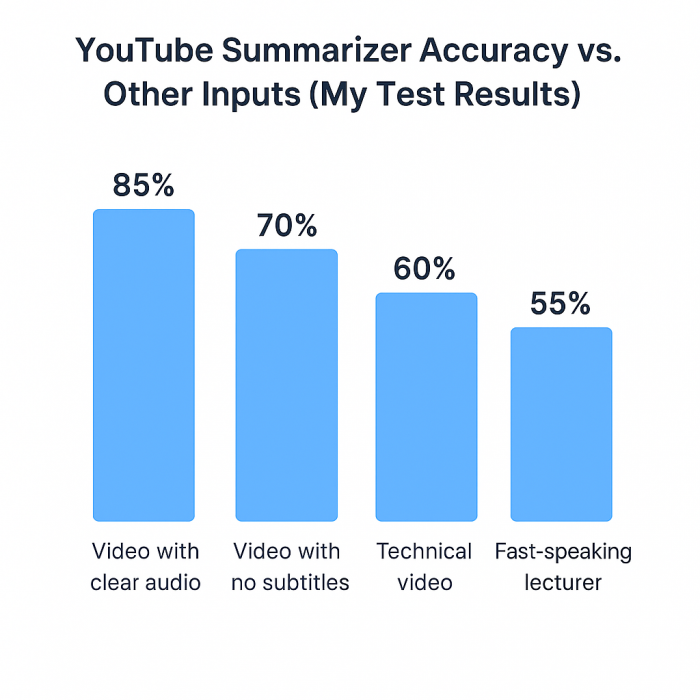
I pasted a long lecture that had no subtitles.
Transcription Quality
The transcription was fairly accurate, around 85%, but it struggled with:
- fast speakers
- accented speech
- technical jargon
Some terms were mis-transcribed, which affected the final summary.
Summary Output
The summary itself was:
- structurally correct
- readable
- decently formatted
But lacked:
- nuance
- technical depth
- accurate reproduction of equations or examples
My conclusion:
Great for quick understanding, not great for serious study.
PDF Summarizer: Good for Casual Use, Weak for Academic Reading
I uploaded a dense PDF with:
- studies
- statistics
- formulas
- citations
What worked
- Extracted the text cleanly
- Gave section-wise summaries
- Highlighted key bullet points
What didn’t
- Oversimplified complex arguments
- Removed context
- Misunderstood cause-effect relationships in research sections
- Ignored charts and tables entirely
For lighter PDFs (e.g., reports, essays), the summarizer performed much better.
My conclusion:
Use it for overview, not for research comprehension.
Audio/Video Transcriber: Decent but Not Desktop-Level Accuracy
I uploaded a 12-minute webinar recording.
Good points
- Fast transcription
- Good paragraph formatting
- Speaker separation was attempted, though imperfect
Weak points
- Background noise confused the AI
- The tool doesn’t do real-time meeting transcription
- Words sounded phonetically interpreted instead of meaningfully understood
It’s usable, but nowhere near Otter AI or other specialized transcription services.
PPT Summarizer & Slide Generator: Very Basic
I uploaded a 10-slide business deck.
The summarization output was:
- clean
- readable
- structured
But:
- lacked depth
- missed visual elements
- output slides looked generic
- required human editing to be usable
This tool is more of a draft generator, not a finished-product tool.
Flashcards, Mind Maps, Quiz Generator: Fun but Limited
These tools rely entirely on the summary output, so any inaccuracies explode downstream.
Flashcards
- Good for simple concepts
- Misleading for complex ones
Mind Map
- Basic branching
- No customization
Quiz Generator
- Good for general recall questions
- Weak for conceptual or analytical questions
Writer Tools: Standard GPT-Level Output
Tools like:
- Essay Writer
- Story Generator
- Paragraph Maker
- Idea Generator
…all behave like standard LLM text generators.
Strengths
- Good for drafts
- Quick ideation
- Decent structure
Weaknesses
- Generic tone
- Repetitive
- Requires editing
- No deep knowledge capability
Nothing unique here, just repackaged AI writing.
Diagram Tools: Only Suitable for Simple Visuals
- Flowchart Maker
- Mind Map Generator
- ER Diagram Maker
- Infographic Generator
They are:
- simple
- AI-constructed
- visually minimal
But:
- lack customization
- inaccurate for domain-specific diagrams
- not competitive with specialized diagram tools
Pricing Review: Functional but Not Great Value for Occasional Users
The pricing page shows tiers with limits on:
- summaries
- uploads
- AI usage
- downloads
My observation:
“The free plan is too restricted to actually evaluate the tool properly.”
Paid plans unlock everything, but I personally felt:
If you use NoteGPT AI daily → it’s reasonable
If you use NoteGPT AI occasionally → pricing feels steep
Many Reddit users echoed the same concern.
Where NoteGPT AI Honestly Performs Best
Students watching long lectures
It makes class review easier.
People who want quick summaries
Great for getting the gist of long content.
Professionals attending webinars
Summaries help recap sessions.
Teachers creating worksheets or study guides
The worksheet tools are surprisingly decent.
Users who need many AI tools in one place
If you prefer an “all-in-one” AI environment, this fits.
Where NoteGPT AI Performs Poorly
Technical, scientific, or academic content
It cannot preserve precision.
Real-time work
No live transcription or live summarizing.
Users needing accuracy for exams
Oversimplification can be harmful.
People who dislike cluttered interfaces
NoteGPT AI’s UI is dense and sometimes confusing.
Users expecting “presentation-ready” slides
Outputs are just starting points.
The Psychological Experience of Using It
This is something I didn’t expect to comment on, but it matters.
Early Stage Feel:
“Woah, this tool has EVERYTHING.”
Middle Stage Feel:
“Why are there ten different summarizers? Which one should I use?”
Late Stage Feel:
“This tool tries to do too much. But if I stick to a few features, it’s usable.”
This led me to ignore 70% of the tools and use only:
- PDF Summarizer
- YouTube Summarizer
- Audio Transcriber
- Flashcards
- Mind Map maker
And that’s when the tool became manageable.
Final Verdict
After using NoteGPT AI for a week, here is my honest summary:
NoteGPT AI is broad, not deep.
Convenient, not precise.
Time-saving, not accuracy-saving.
It’s good for:
- quick overviews
- helping with content overload
- basic study outputs
- rough drafts
- casual learning
But not good for:
- academic reliability
- context-sensitive summarizing
- technical comprehension
- polished content production
If I had to describe it in one sentence:
“A general-purpose AI study assistant that works well as long as you understand its limitations.”
Post Comment
Be the first to post comment!