AI-generated content is increasingly common, but it often lacks the nuance and flow of natural writing. This can lead to content being flagged by AI detectors, which is a concern for students, marketers, businesses, and anyone relying on AI tools for content creation. Humanize AI Pro helps in converting AI-generated text into writing that reads more naturally.

Key Features and Capabilities
- AI Text Humanization: Adjusts tone, vocabulary, and sentence structure to create more natural writing for various contexts, including formal, informal, and academic.
- Multiple Writing Modes: Offers modes such as Simple, Normal, Advanced, and “Ultra Run” for different levels of humanization.
- SEO Structure Retention: Maintains keyword density and layout, supporting SEO goals while humanizing the text.
- Multilingual Support: Works with several languages, including English, Chinese, Arabic, Russian, and Japanese.
- No Installation Required: Fully web-based with a straightforward dashboard; no technical setup needed.
- Data Privacy: Processes content securely and keeps user data confidential.
- Compatibility: Designed to work with major AI detection tools.
- Customization: Allows users to set tone, length, and vocabulary style for each project.
Pricing and Plans (May 2025)
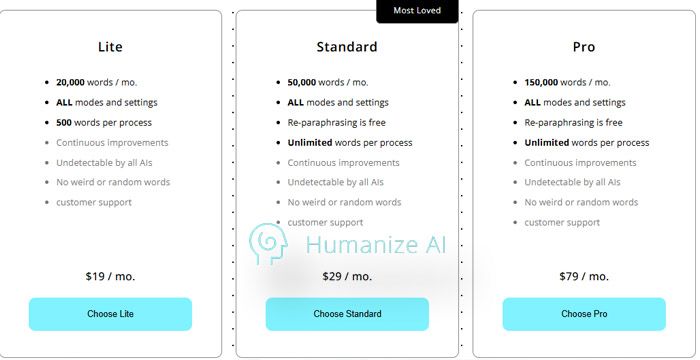
| Plan | Price/Month | Word Limit | Features Included |
| Free | $0 | 3,000 | Basic modes, no registration |
| Basic | $19 | 20,000 | All writing styles unlocked |
| Standard | $29 | 50,000 | Team features, rephrasing, content export |
| Pro | $79.5 | 150,000 | Premium support, agency-level usage |
- Annual plans offer 50% off monthly rates.
- Free trial available with limited word count.
Does Humanize AI Pro Bypass AI Detectors?
Humanize AI Pro is designed to help users avoid detection by major AI detectors and plagiarism tools. Many users find it effective for basic and mid-level content, but results can vary, especially with advanced detectors or more complex writing. Some users report that longer or technical content may still be flagged, and output can occasionally sound less natural.
Community Insights: What Reddit and Product Hunt Users Think
- Positive: Users appreciate the ease of use, quick results, and the ability to humanize content for blogs, assignments, and client work.
- Negative: Some users feel the output can be generic or awkward, especially with advanced detectors or longer texts. Others mention the limited free usage and lack of API integration as drawbacks.

Troubleshooting & Support Experience
Support experiences with Humanize AI Pro are mixed. Some users find the team responsive, while others report delays or unresolved issues, particularly when dealing with awkward output or billing questions. Those relying on the tool for urgent projects may want to test support responsiveness before committing to a paid plan.
Best Use Cases for Humanize AI Pro
- Bloggers and Content Creators: Refine AI drafts before publishing for a more natural feel.
- Students: Adjust assignments to reduce the likelihood of AI detection (with ethical use).
- SEO Professionals: Maintain rankings while improving readability.
- Freelancers and Agencies: Deliver polished content at scale.
- Non-native English Speakers: Enhance clarity and tone in written work.
Limitations and Drawbacks
- It may still be flagged by advanced AI detectors, especially for complex or lengthy content.
- Output can sometimes sound generic or awkward.
- No API or bulk processing options.
- The free plan has strict word count limits.
- No offline or dedicated mobile app support.
Recent Updates for 2025
- Expanded language support for more global users.
- New “Ultra Run” mode for higher detection evasion.
- Improved processing speed and sentiment control.
- No API or mobile app as of May 2025.
How Does It Compare? Humanize AI Pro vs. Other AI Humanizers

| Tool | Best For | Starting Price | Detection Evasion | Customization | Multilingual | User Rating |
| Humanize AI Pro | SEO, blogs, students | Free/$19+ | Moderate | High | Yes | 4.5/5 |
| StealthWriter | SEO-heavy articles | $20/mo | High | Medium | Yes | 2.3/5 |
| HIX AI | Multilanguage bypass | $14.99/mo | High | High | Yes | 2.0/5 |
| QuillBot | Short-form rewriting | Free | Moderate | Medium | Yes | 4.7/5 |
FAQ: Quick Answers About Humanize AI Pro
- Is Humanize AI Pro free to use?
A limited free plan is available, but full features require a paid subscription. - Can it bypass Turnitin or Winston AI?
Results vary; the tool sometimes fails with advanced detectors. - Is my data safe?
The platform emphasizes privacy and does not store user content. - Is there an API or mobile app?
As of May 2025, neither is available.
Is Humanize AI Pro Worth It?
Humanize AI Pro provides a straightforward way to humanize AI-generated content for everyday needs. Its effectiveness is best for quick edits and basic content, but it may not always deliver undetectable results for advanced or technical writing. The tool is most suitable for users seeking a simple solution to improve the naturalness of AI text, with the understanding that some limitations remain.
Post Comment
Recent Comments
David Harris
Jul 4, 2025I appreciate the multiple writing modes that Humanize AI Pro offers. From Simple to Ultra Run, I can adjust the level of humanization based on the project. For quick blog posts, the Simple mode works wonders, but for more advanced content, the Advanced or Ultra Run modes give me the polished result I need. It’s flexible enough for any content needs.






Michael Clark
Jul 4, 2025What I love most about Humanize AI Pro is how easy it is to get started. There’s no installation required, and the web-based interface is super simple to use. I was up and running in no time. The straightforward dashboard makes navigating the platform a breeze, even for someone who’s not very tech-savvy