AI writing tools have made content production dramatically faster, but they have also introduced a new problem. Much of the output still sounds mechanically smooth rather than naturally human. That gap has created strong demand for AI humanizers, tools designed to polish machine-generated drafts into something more readable.
Grubby AI sits directly in this niche. It positions itself as a post-processing layer for AI text, aiming to smooth tone, adjust structure, and reduce the chance of AI detection flags. Based on hands-on observations, independent tests, and the platform’s current pricing page, the reality is useful but far from magical. Here is a grounded walkthrough of what the tool actually does.
What Grubby AI Is
Grubby AI is a browser-based AI text humanizer whose main job is rewriting AI-generated content to sound more natural. It does not create original articles or essays. Instead, it restructures existing text.
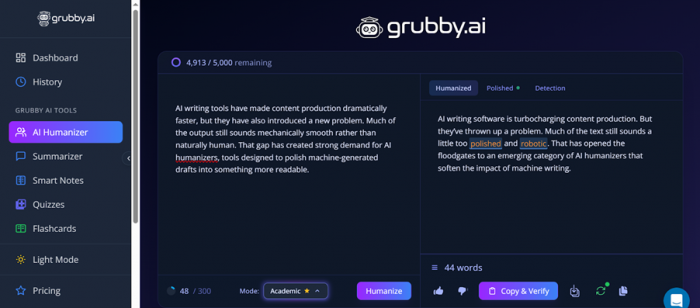
The platform promotes a Dynamic Anti-Detection Algorithm that attempts to modify patterns commonly flagged by AI detectors. In practical use, this means adjusting sentence flow, vocabulary variation, and phrasing while trying to preserve the original meaning.
The workflow is intentionally simple. Paste text, choose a mode, click Humanize, and review the output. No installation is required, and the interface is designed for quick turnaround rather than deep editing.
The Problem Grubby AI Is Trying to Solve
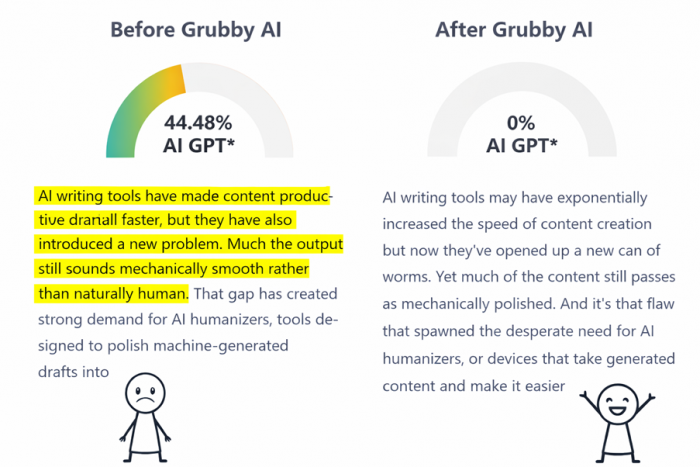
AI-generated writing often shows predictable patterns. Sentences may be grammatically correct but rhythmically uniform. Vocabulary can feel safe but repetitive. Detection tools such as GPTZero, Originality.ai, and Turnitin are designed to identify those patterns.
This creates friction for several groups:
• students working with AI-assisted essays
• SEO writers producing bulk content
• marketers polishing client copy
• freelancers handling high-volume drafts
Manual editing can fix many of these issues, but doing it repeatedly at scale takes time. Grubby AI positions itself as the last-mile cleanup layer between raw AI output and publish-ready text.
How Grubby AI Works in Practice
The tool follows a straightforward three-step workflow.
Step 1: Input
Text is pasted into a large input box on the homepage. Some versions allow file upload, but the paste workflow is the most common.
The interface is minimal and easy to understand within seconds.
Step 2: Mode Selection and Processing
Users choose how aggressively the text should be rewritten.
| Mode | What It Does | Typical Use |
| Simple | Light phrasing adjustments | Quick cleanup |
| Enhanced | Deeper restructuring | More natural flow |
Some builds also allow tone selection such as professional or academic. Clicking Humanize triggers the rewrite. Short passages usually process within a few seconds.
Step 3: Review and Export
The rewritten text appears below the original. From there, the workflow is simple: review, copy, and paste into the final destination.
This frictionless loop is one of the platform’s stronger usability points.
Key Features at a Glance
Based on platform behavior and review aggregation, the core capabilities include:
• AI text humanization
• detection-aware rewriting
• plagiarism-free phrasing shifts
• multilingual support across 30 plus languages
• multiple rewrite modes
• browser-based access
Some versions also bundle secondary utilities such as:
• Summarizer
• Smart Notes
• Quiz and flashcard generator
These extras add flexibility, although the humanizer remains the primary reason most users arrive.
Real Performance: What Independent Tests Show
Independent testing paints a mixed but informative picture.
Detector Test Snapshot
| Source | Detector | Observed Result |
| Techpoint Africa | CopyLeaks | Passed in test case |
| Toolsmart AI | GPTZero | about 93 percent human |
| Toolsmart AI | Originality.ai | heavily flagged |
| GeniusFirms aggregate | multiple tools | around 60 percent human average |
| GPTHumanizer review | quality scoring | about 61.56 percent naturalness |
Key takeaway: results vary significantly depending on the detector and the input text.

In some cases, the rewritten content appears convincingly human. In others, detection systems still flag notable AI probability. This variability is common across the humanizer category and should be kept in mind.
Output Quality Observations
Across hands-on reviews, several consistent patterns appear.
Where the tool performs well
• sentence flow often improves
• transitions become smoother
• conversational tone increases
• readability gains are noticeable on simple drafts
Where friction appears
• occasional meaning drift
• some over-polished phrasing
• uneven handling of complex material
• technical language sometimes weakened
The tool improves surface fluency but still benefits from human review, especially for high-stakes content.
Pricing and Access Reality
Based on the current pricing screen, Grubby AI uses a tiered subscription model.
Current Plan Structure
| Plan | Price (monthly) | Word Allowance | Billing Note |
| Essential | $4.99 | 10,000 words per month | billed annually |
| Pro | $9.99 | 30,000 words per month | billed annually |
| Unlimited | $14.99 | Unlimited words | billed annually |
| Enterprise | $39.99 | Unlimited words | for teams |

Practical pricing notes
• the free tier is limited and primarily for testing
• Essential works for light individual use
• Pro targets regular content workflows
• Unlimited removes word pressure but still depends on output quality
• Enterprise appears aimed at agencies or teams
Pricing is competitive at the entry level, though value depends heavily on how often the humanizer is needed.
Who Actually Uses Grubby AI
Usage patterns across reviews and community discussions are fairly consistent.
Most common users
• students editing AI-assisted essays
• SEO writers producing blog content
• freelance writers polishing drafts
• marketers improving readability
Less typical users
• purely manual writers
• highly technical researchers
• long-form academic editors
Highly specialized academic or technical text remains a weaker fit.
Strength Signals
Several positives appear repeatedly.
• very simple workflow
• fast processing for short text
• low learning curve
• focused single-purpose design
• multilingual capability
• useful for bulk cleanup scenarios
For users working with large volumes of AI drafts, the speed alone can be appealing.
Friction Signals and Limitations
Equally important are the recurring concerns.
• detection bypass is inconsistent
• average human scores often hover near 60 percent in tests
• output still requires human review
• free access is very limited
• non-English handling can be uneven
• occasional meaning shifts in rewritten text
• some community feedback appears overly promotional
The tool is functional, but expectations should remain grounded.
Trust and Legitimacy Snapshot
| Signal | Status |
| Functional product | yes |
| Independent testing | available |
| Major security audit | not found |
| Directory listings | present |
| Community sentiment | mixed |
The overall picture suggests a legitimate working product, though not one that consistently meets its most ambitious marketing claims.
Final Take
Grubby AI fills a clear role in the modern AI writing workflow. It works best as a fast polishing assistant for AI-generated drafts, particularly in high-volume environments where manual editing becomes repetitive.
It does improve readability in many cases. It does not reliably guarantee detection avoidance across all tools. And it definitely does not replace careful human editing, despite what the more optimistic marketing language might imply.
In practical terms, it is a useful helper when used with realistic expectations. Just not the mythical “make this perfectly human” button that the internet occasionally hopes for.
Post Comment
Be the first to post comment!