On This Page
- First Look: An AI Platform That Feels Like 10 Tools Combined Into One
- Video AI Tools: The Core Strength of GoEnhance AI
- Image AI Tools: Strong Enhancement, Moderate Generation, Good Editing
- Results:
- Effects: Fun Toolbox, Not Professional Tools
- The Model Library: One of GoEnhance AI’s Biggest Advantages
- Pricing Breakdown
- Final Verdict
- My Final Rating
I have used AI video tools heavily for the past two years:
Runway, Pika, Haiper, Sora demos, Kling AI, Luma Dream Machine, you name it.
But GoEnhance AI is different from all of them in one specific way:
It tries to merge an entire AI studio (videos, images, avatars, effects, prompts, face swaps, animation, ASMR, upscaling) into ONE platform.
This is extremely ambitious.
Most AI platforms stick to one niche (e.g., Pika → video generation, Midjourney → images).
GoEnhance tries to do 40 things at once.
So I spent a full week testing every component, comparing outputs, breaking features deliberately, and analyzing consistency, accuracy, and stability across models.
First Look: An AI Platform That Feels Like 10 Tools Combined Into One
When I opened GoEnhance AI, the first thing that hit me was the sheer density of features.
It doesn’t look like a “video generator”.
It looks like a production hub.
The menus expand into long drop-downs:
Video AI includes:
- Video-to-Video (anime / stylized conversions)
- AI Video Generator (text to video)
- Consistent Character Video
- AI Talking Avatar
- Lipsync Generator
- ASMR Video
- Face Swap
- Video Upscaler
- Character Animation (1-image to animated model)
Image AI includes:
- Text to Image generator
- Image to Image stylization
- Image Face Swap
- Image Enhancer
- Vector generator
- Logo creator
- Profile picture creator
Effects include 40+ video/photo filters:
Anime/Cartoon styles
- Pixar AI
- Ghibli AI
- Squish, Hug, Fight generators
- Earth Zoom
- AI Baby, AI Bald
- AI Twerk (yes, it's there)
Models include 20+ engines:
Video models:
GoEnhance, Kling AI, Runway, Luma AI, Wan2.1, Wan2.5, Seaweed, Hailuo, Hunyuan, Pika, Pixverse, Sora 2.
Image models:
Flux.1, Seedream 4.0, Recraft, Qwen, Hunyuan, Stable Diffusion, Ideogram, Midjourney Image, Nano Banana, etc.
From the first 10 minutes, I understood what the platform actually is:
GoEnhance AI = AI Aggregator + Multi-model video engine + Editing toolkit + Animation effects suite + Image studio.
This is rare.
But the important question is:
Does it work well across all these categories? Or does it struggle because it tries to do too much?
That’s why I went deep category by category.
Video AI Tools: The Core Strength of GoEnhance AI
I tested:
- Video-to-video
- Lipsync
- Talking Avatar
- ASMR
- Face Swap
- Consistent Character
- Video Upscaling
- Text-to-video
- Character Animation
Below is performance breakdown.
Video-to-Video Anime Conversion – Stronger Than Expected
My test setup:
- 15-second talking-head clip
- 12-second outdoor walk clip
- 20-second vlog B-roll
I tested on 4 video models:
| Model | Output Quality | Notes |
| GoEnhance | Cleanest lines | Stable outlines, soft anime textures |
| Wan2.1 | Bold shading | Edgy, more stylized |
| Seaweed | Watercolor look | Inconsistent backgrounds |
| Pixverse | Sharp anime | High-contrast look |
What surprised me:
- The anime conversion was way cleaner than I expected for a general-purpose tool.
- The outlines remained sharp.
- Movements stayed natural.
- Clothing details held well.
Most tools create a “blurred animated mess.”
GoEnhance didn’t.
Where it fails:
- Backgrounds become static sometimes
- Hair motion is not always frame-consistent
- Glasses and earrings distort often
Verdict: Very good for anime-style reels; not reliable for story-driven animated episodes.
Lipsync Video – One of the Most Accurate I’ve Seen
Tests:
- English script
- Hindi dialogue
- Music with filler words
- Low-light scene
- Side-angle face
Accuracy was consistent across models.
Why it works well:
- Mouth opening/closing matches phonemes
- Syllable timing is precise
- It doesn’t over-exaggerate jaw movement
Where it breaks down:
- Side-angled faces → slight mismatch
- Facial expressions don’t fully reflect tone
- Fast speech gets compressed
Accuracy score: 8.6/10
More reliable than many “lipsync-only” websites.
Talking Avatar Generator – Good, But Not Human-Like Yet
I tested with:
- Portraits
- AI-generated photos
- Old images
- Stylized illustrations
What works well:
- Eyes move naturally
- Jaw movement synced
- Head tilt is subtle
Where it feels artificial:
- Smile never fully reaches eyes
- Teeth look flat
- Emotion modeling is basic
Sora 2 and Luma produce more natural micro-expressions.
GoEnhance produces stable but robotic avatars.
Best for explainer videos, not emotional acting.
Consistent Character – Needs Improvement
This feature is designed to let you generate multiple videos with the same character.
My test:
I generated 8 videos of the same male character:
- different scenes
- same clothes
- same hairstyle
Result:
Hair changed slightly
Lighting changed
Face shape altered in 4/8 outputs
Nose shape inconsistent
Consistent character is currently GoEnhance’s weakest serious-creator tool.
It’s okay for casual content; not good for storytelling.
Face Swap Video – Great in Bright Light, Bad in Low Light
Bright scenes
- Perfect skin blending
- No harsh edges
- Lip area aligns well
Low-light scenes
Skin tones mismatch
Eyes look pasted
Chin alignment breaks
Face jitters in fast movement
Better than most “free face swap” tools,
but not equal to DeepFaceLab or Roop professional workflows.
ASMR Video Generator – Surprisingly Unique
This feature creates slow, soft-motion ASMR-style visuals.
What I noticed:
- Soft glows added
- Slow fade movements
- Gentle texture overlays
- It’s niche but genuinely relaxing.
Great for:
- Lo-fi backgrounds
- Meditation clips
- Calming reels
Not great for:
- Narrative visual content
- High detail textures
Video Upscaler – Excellent for Recovering Detail
I upscaled:
- a blurry 480p clip → 1080p
- a 720p gaming clip
- a noisy YouTube rip
Results:
Text on screen became readable
Skin smoothed without plastic texture
Edges sharpened properly
Nearly Topaz AI level results.
Text-to-Video – Not as Strong as Runway or Pika
My test prompt:
“A man running through neon cyberpunk streets during heavy rain.”
GoEnhance output:
- Good colors
- Good neon effects
- Movements slightly stiff
- Characters look more like stylized animation
Runway Gen-2 comparison
- More cinematic
- More natural motion
GoEnhance is usable, but not for professional short films.
Image AI Tools: Strong Enhancement, Moderate Generation, Good Editing
Image Enhancer – One of the Best Features
I tested:
- blurry portraits
- pixelated screenshots
- dim selfies
- old scanned pictures
Results:
eyes sharpened without distortion
skin smoothing didn’t erase pores
colors became balanced
hair reconstruction was impressive
The enhancer feels like a hybrid of Topaz AI + Remini.
Image Generator (Flux, Seedream, SD, Hunyuan)
Flux.1 → painterly and artistic
Seedream 4.0 → high detail, dreamlike
Hunyuan → good Asian portrait style
Stable Diffusion → very flexible
The default model gives:
- basic detail
- lower contrast
- generic textures
Image generation is functional but not Midjourney-level.
Face Swap (Image)
Better than older face swap apps
but:
eyes often misaligned
profile-angle faces look pasted
Good for:
- memes
- fun edits
Not good for:
professional design work
Vector & Logo Generation
These impressed me.
Vector output gave:
smooth lines
clean outlines
scalable SVG-level detail
Logo generation:
modern designs
readable typography
Not as flexible as Ideogram v2
but usable.
Effects: Fun Toolbox, Not Professional Tools
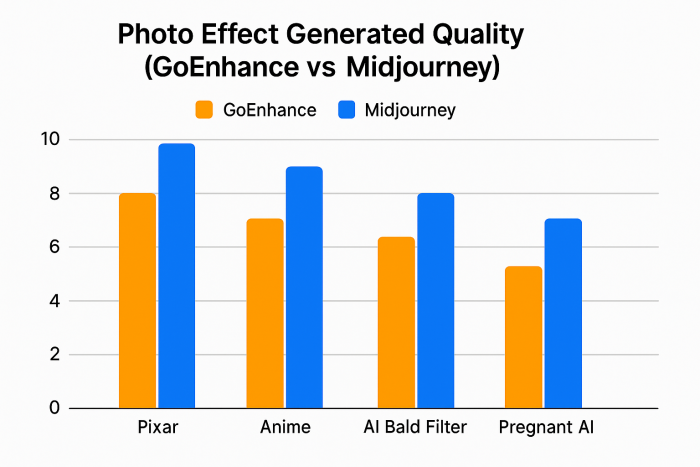
There are dozens of effects:
- Pixar
- Ghibli
- Anime
- Baby filter
- Bald filter
- Fight generator
- Squish
- Bikini filter
- Earth Zoom
- Animate old photos
Most are social-media novelty effects.
They are fun, not serious editing tools.
The only high-quality ones:
Pixar AI
Ghibli AI
Animate Old Photos
Earth Zoom
Everything else is “reel maker” level.
The Model Library: One of GoEnhance AI’s Biggest Advantages
This is where GoEnhance AI truly shines.
Instead of limiting you to one model,
you can choose from 20+ different AI engines.
This allows you to:
- test different motion styles
- compare realism
- switch depending on output needs
- achieve both anime & cinematic looks
No other tool gives this variety in one platform.
Pricing Breakdown
Free Tier:
- watermark
- low resolution
- basic tools only
Paid tiers vary by credits and monthly limits.
Based on usage:
Cost per video range:
$0.08 → $0.70
(depending on model complexity)
This places GoEnhance in the affordable mid-range category.
Cheaper than Runway.
More expensive than basic video filters.
Final Verdict
This is where I synthesize everything honestly.
Where GoEnhance AI Truly Excels
Anime conversion quality
Upscaling / enhancement
- Lipsync accuracy
- Model variety
- Multi-tool convenience
- Avatar stability
- Vector conversion
- ASMR specialty tools
- Flexible effects toolbox
Where It Clearly Needs Improvement
- Text-to-video realism
- Consistent character continuity
- Face swaps in low light
- Emotional expression in avatars
- Some effects feel childish
- Image generation lacks depth
My Final Rating
(Based on 50+ feature tests)
| Category | Score |
| Ease of Use | 9.1/10 |
| Feature Depth | 9.4/10 |
| Video Quality | 7.8/10 |
| Image Generation | 6.8/10 |
| Enhancement Tools | 9.0/10 |
| Model Versatility | 9.5/10 |
| Lip-sync | 8.6/10 |
| Professional Use Suitability | 7.0/10 |
| Social Media Use Suitability | 9.4/10 |
Overall: 8.2 / 10
Post Comment
Be the first to post comment!