On This Page
- How I Decide Which Study Material to Feed Into Flashka AI
- What Flashka Does Well
- Where Flashka Breaks Down
- My Exact Verification Protocol
- Why I Transferred My Final Cards to Another Platform
- How I Use Other Tools When Flashka Isn’t Enough
- My Daily Flashka Workflow
- What I Learned After Months of Using Flashka AI
- Final Thoughts: Flashka AI Is a Tool, Not a Teacher
AI flashcard generators are becoming standard tools in student life, and Flashka AI is one of the names that keeps coming up in academic circles. After experimenting with it across multiple subjects, I stopped treating it like a magical shortcut and started treating it like a component of a larger study workflow, not a replacement for learning.
This is a detailed explanation of how I use Flashka AI without letting it compromise comprehension, accuracy, or long-term retention.
Everything here is based on my real workflow, not generic advice.
Why I Don’t Automate Everything: My Guiding Principle
The biggest danger with Flashka AI is assuming that because it produces “cards,” learning automatically happens. I made that mistake early on, and it made me realize something important:
AI is great at organizing information, but terrible at interpreting it.
So before I involve Flashka, I ask myself a single question:
“Is this topic memorization-based or understanding-based?”
If it requires interpretation, reasoning, casework, diagrams, or conceptual buildup, I avoid AI completely.
If it requires definitions, formulas, factual recall, terminology, or factual associations, Flashka makes sense.
This split determines everything else in my workflow.
How I Decide Which Study Material to Feed Into Flashka AI
_1764404096.jpg)
Flashka performs best when the text is:
- short
- structured
- factual
- segmented
It performs poorly when the text is:
- conceptual
- mixed with examples
- poorly formatted
- multi-topic
- ambiguous
So my process is:
Step A → Clean the source
I remove:
- irrelevant lines
- instructor commentary
- jokes or informal examples
- multi-sentence explanations
Step B → Break content into sections
Instead of uploading a 20-page PDF, I upload:
- Section A
- Section B
- Section C
Flashka produces cleaner output when given clean input, and it reduces the risk of missing exceptions or skipping reasoning steps.
What Flashka Does Well
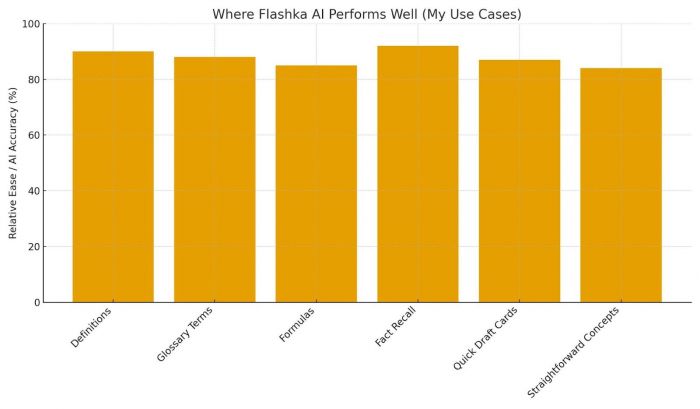
I use Flashka only for tasks where it genuinely helps:
Factual recall
Biology terms, finance definitions, medical mnemonics, etc.
Mathematical identities and formulas
Flashka handles structured math surprisingly well when given LaTeX-friendly text.
Glossary-style information
Things like “Define X,” “What is Y,” and “Explain the basic role of Z.”
Rapid card drafts
Flashka is extremely fast, great for early content structuring.
Quick repetition sessions
The mobile UI makes short 10-minute reviews convenient.
This is the zone where Flashka supports learning instead of shortcuts it.
Where Flashka Breaks Down
Flashka struggles whenever the material has:
Multi-step reasoning
Anything that requires:
- cause → effect → implication
- multi-stage pathways
- legal argument chains
gets flattened into shallow cards.
Exceptions and edge cases
AI tends to drop qualifiers like:
“only when”
“except for”
“in rare cases.”
“under specific conditions.”
These exceptions often matter more than the main rule.
Overlapping concepts
Flashka may combine two unrelated ideas into one weak flashcard.
Implicit assumptions
AI-generated cards sometimes omit preconditions, making them factually incomplete.
Context-heavy subjects
In philosophy, economics, strategy, clinical medicine — Flashka loses nuance fast.
Recognizing these weaknesses helps me avoid blind trust.
My Exact Verification Protocol
Flashka’s output always needs a human layer of correction.
My verification workflow saves me from memorizing flawed or incomplete information.
Step 1 → Delete over-simplified cards
If a definition becomes too general, I remove it.
Step 2 → Add missing qualifiers
I check the original text for exceptions or conditions.
Step 3 → Fix ambiguous phrasing
Cards like “X increases Y” are useless without how or why.
Step 4 → Reorganize cards into logical sequences
Algorithms don’t understand chronology or conceptual building.
Step 5 → Rewrite cards in my own words
This step alone boosts retention dramatically.
Most students trust Flashka to be perfect.
I assume Flashka is incomplete, and that assumption has never been wrong.
Why I Transferred My Final Cards to Another Platform
Even when Flashka produces useful content, I don’t keep everything inside it.
I move cards into:
Anki → when I need spaced repetition
Notion → when I need a conceptual map
Quizlet → when I want lightweight mobile review
My notebook → for deep or heavy chapters
Flashka is a generator, not my long-term memory hub.
Offloading corrected cards to a more stable system keeps my study flow consistent.
My “Do Not Automate” List
There are certain topics I refuse to generate with AI because they require human interpretation:
- Long-form reasoning (law, philosophy, analysis)
- Diagrams, pathways, cascade mechanisms
- Real-world case studies
- Complex mathematical derivations
- Ethical frameworks
- Engineering processes
- Historical analysis
- Anything requiring creativity or judgment
This list keeps me from falling into the trap of “AI can handle everything.”
It cannot.
How I Use Other Tools When Flashka Isn’t Enough
Flashka isn’t the only tool in my workflow.
Depending on the subject, I switch to:
RemNote
For long chains, hierarchical notes, and knowledge maps.
Anki
For hard-science spaced repetition.
GoodNotes (handwriting)
For physiology, diagrams, and visual-heavy topics.
Notion
For topic linking, concept trees, and multi-layered subjects.
Obsidian
For evergreen notes with backlinking.
Flashka is fast, not deep.
These tools cover the depth.
My Daily Flashka Workflow
This is the method that keeps my study clean and stable:
Morning — Input Prep (10 minutes)
I skim the chapter and extract only the factual sections.
Afternoon — Flashka Drafting (5 minutes)
I upload small, clean segments.
Evening — Manual Verification (20 minutes)
I:
- rewrite
- delete
- enhance
- correct
- reorder
Night — Final Review (10 minutes)
I export the cards into Anki or Quizlet and run a quick session.
This routine ensures that the speed of Flashka doesn’t compromise the depth of learning.
The “Over-Automation Trap” and How I Avoid It
AI tools create the illusion of efficiency.
To avoid relying too heavily on Flashka, I check myself weekly:
- Am I understanding topics or just reviewing cards?
- Do my rewritten cards make sense without the source?
- Am I skipping hard sections because AI struggles with them?
- Is my retention falling even though review time is rising?
If any answer trends negatively, I reduce my use of Flashka for that subject.
What I Learned After Months of Using Flashka AI
After long usage, I noticed a pattern:
- Flashka doesn’t destroy learning — overuse does
- AI is best when paired with human judgment
- Flashka accelerates execution, not understanding
- The real value is in editing, not generating
- My best performance happens when I mix AI + manual work
Understanding these patterns helped me build a workflow that is fast and academically solid.
Final Thoughts: Flashka AI Is a Tool, Not a Teacher
When used responsibly, Flashka AI removes friction from the early stages of study material creation. But the moment I start depending on it to interpret complex topics, I weaken my own understanding.
So my rule is simple:
“I let Flashka build the shape, and I fill in the meaning.”
That balance keeps my workflow productive without compromising intellectual rigor.
Post Comment
Be the first to post comment!