iOS 26 Beta 2 is here—and it’s all about making your iPhone feel smarter, snappier, and more personal. Apple’s latest test build adds just-right refinements across the Control Center, personalization settings, and media playback, with cool surprises awaiting early adopters.
Seamless Control Center Shortcuts
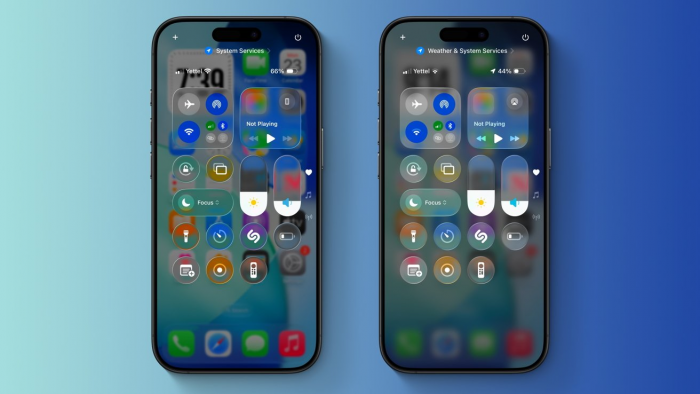
Seen the new “ringtones +” button? Beta 2 introduces a tidy audio toggle in Control Centre that switches you between silent, vibrate, and ring in one tap — no more digging through Settings. Another win: a revived Recovery Assistant control makes emergency boot actions easier than before .
Your Control Centre now feels intuitive, not only functional — Apple’s brushing off the friction.
Parallax Wallpapers That React to You
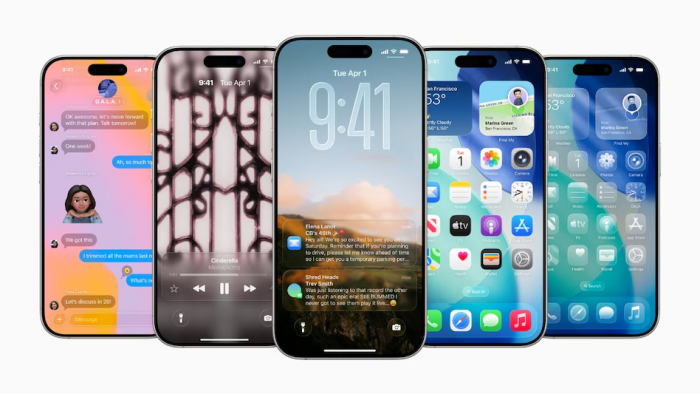
Say hello to live-responsive wallpapers: Beta 2 brings back parallax effects that shuffle based on your phone’s angle and movement. Yes, this is the feeling-iPhone-antics of iOS 7-era Apple… refined, modern, and smooth .
It’s a subtle shift, but in a sea of monochrome themes, motion brings delight to everyday use.
Apple Music Widgets Go Next-Level
If you're jamming with Apple Music, you’ll love the supercharged widgets in Beta 2. They show recently added albums, display contextual Mixes, and even allow you to swap between stations on the fly — all from your home screen .
Playing music doesn’t demand an app dive anymore — it flows directly from the widget.
Extra Perks You Don’t Know You Needed
Beta 2 also brings a few nifty additions:
- Taptic Engine Logos: Haptic cues on launches and actions feel sharper
- Enhanced AirDrop Prompt: Easier to share with a friend nearby
- Auto-rename Recovery Mode: Helpful naming for devices connected to iTunes
These tweaks might fly under the radar, but they keep the iOS experience clean and coherent.
Who Can Try This, and How
Beta 2 is available now to developers (with a public beta likely soon). If your iPhone’s registered in Apple’s beta program, hit Settings → General → Software Update and kick it off.
Remember: it’s still beta software—expect minor bugs and unpredictable behavior.
Verdict: Smart, Polished, and Feeling Personal
Overall, iOS 26 Beta 2 delivers on Apple’s promise of seamless polish. You get Control Centre shortcuts that make sense, wallpaper animations that spark joy, and media playback controls that feel intuitive. Apple’s classic attention to detail is on full display — without overloading users.
Post Comment
Be the first to post comment!