On This Page
Apple is turning the Photos app into a more active creative workspace, adding new AI-powered tools that let users reframe, expand, and clean up images directly on the iPhone.
Announced at WWDC 2026, the update is part of Apple’s broader Apple Intelligence rollout, but the Photos changes are among the most practical additions for everyday users. Instead of focusing on flashy image generation alone, Apple is targeting common photo problems: awkward framing, tight crops, distracting background objects, tilted shots, and pictures that almost worked but needed a cleaner composition.
The move puts Apple deeper into the AI photo-editing race already shaped by Google, Samsung, Adobe, Canva, and several standalone AI image apps. But Apple’s advantage is distribution. If these tools work smoothly inside the default Photos app, hundreds of millions of iPhone users may not need to move their images into another service for basic AI edits.
That makes this less about one app update and more about Apple’s attempt to make generative editing feel normal, private, and built into the phone.
Reframe fixes the shot after capture
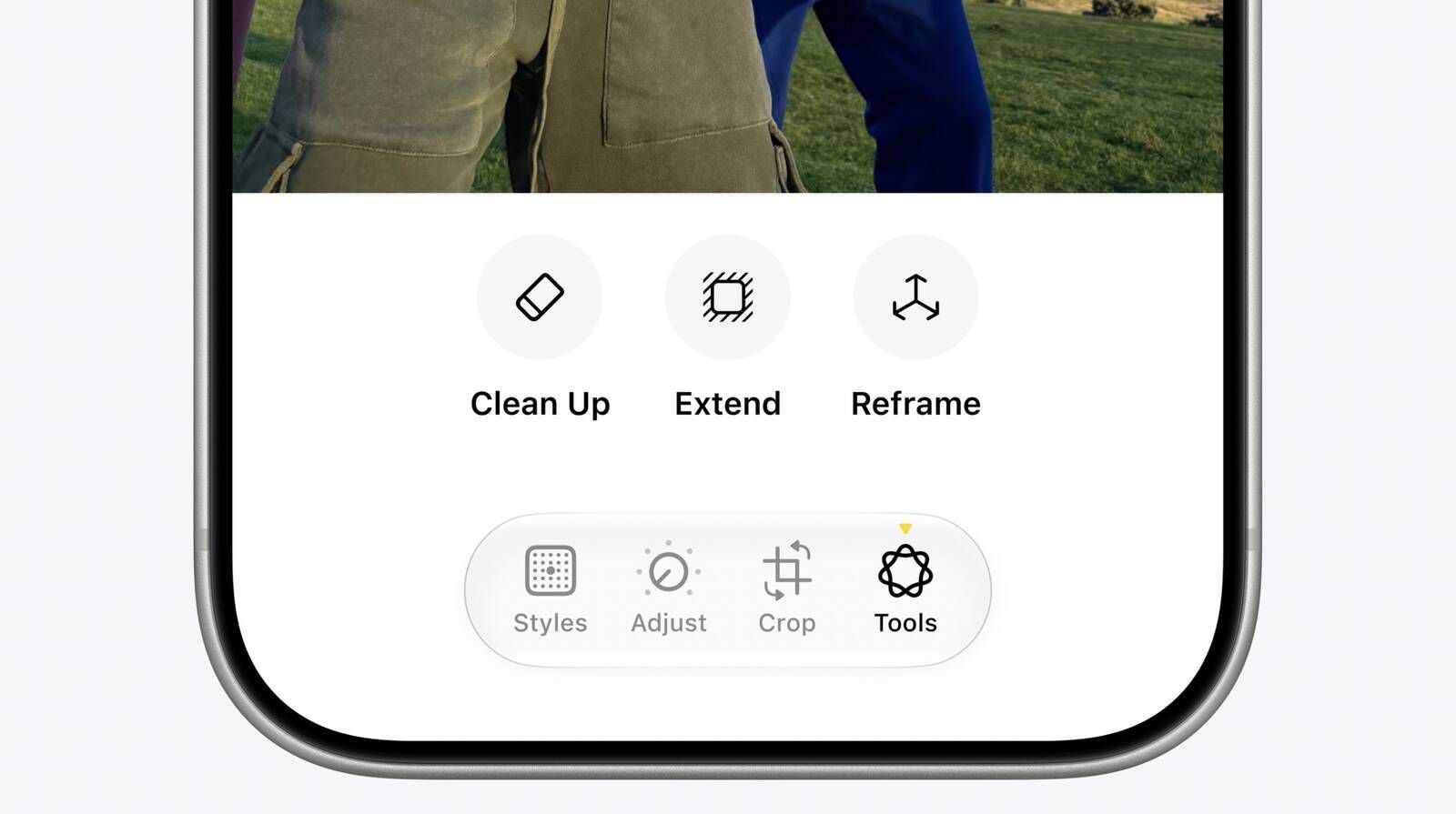
The most notable new feature is Reframe, an AI editing tool that lets users adjust the perspective of a photo after it has already been taken.
Traditional photo editing usually gives users two basic fixes for composition: crop or rotate. Reframe goes further. It allows users to drag the image and shift the visible composition as if the camera had been moved slightly before the shot was captured.
That can solve the small mistakes that often weaken casual photos. A subject may be slightly off-center. A background object may sit awkwardly behind someone’s head. A building may look stronger if the frame had been shifted a little. A group shot may feel unbalanced because of how the scene was captured.
Reframe uses AI to adjust the image perspective and then fill in the affected edges with generated content. Apple is presenting this as a controlled editing tool rather than a full image-generation feature. The goal is not to reinvent the scene, but to keep the photo close to the original while improving balance and composition.
The feature also gives users a real-time preview. As the photo is moved, blurred areas appear around the edges to show where the app will generate missing detail. That makes the editing process easier to understand before users apply the final change.
Extend gives photos more breathing room
Apple is also adding Extend, a tool that expands a photo beyond its original borders. The feature is designed for images that feel too tightly cropped or need extra room around the subject.
This can be useful in several everyday situations. A user may have taken a close-up photo of a building but accidentally cut off part of the structure. A landscape may need straightening, but a normal crop would remove too much of the scene. A portrait may need more background space to fit a social media format or website layout.
Extend solves that by generating additional scenery around the edges of the image. It gives users more room to adjust the final composition without sacrificing important parts of the original photo.
The feature could be especially useful for creators, small publishers, marketers, and casual users who often need the same image in different formats. A vertical story, square post, website header, wide thumbnail, and profile banner may all require different spacing. Extend makes it easier to adapt one photo for several uses without leaving Apple’s built-in app.
Clean Up gets a more realistic fill
Apple is also improving Clean Up, its existing tool for removing unwanted objects from images. The feature already lets users tap, brush, or circle distractions in a photo and remove them. The new version is expected to deliver better quality and more realistic background filling after an object is deleted.
That improvement matters because object removal is one of the easiest AI edits to judge. If the replacement area looks smudged, repeated, warped, or unnatural, the edit becomes obvious. A strong Clean Up tool needs to understand the surrounding texture, lighting, depth, and background patterns well enough to make the removed object disappear naturally.
The feature is aimed at practical fixes rather than heavy manipulation. Users may remove people in the background, clutter on a table, unwanted signs, small objects, or distractions that pull attention away from the subject.
Apple’s approach keeps the tool simple. Some objects can be automatically highlighted for quick removal, while users can manually select others. That fits Apple’s larger pattern with AI: the feature is powerful underneath, but the interface remains familiar and low-friction.
Apple keeps AI editing inside its own ecosystem
The larger story is not simply that Apple is adding tools similar to competitors. It is that the company is putting them inside Photos, one of the most-used apps on the iPhone.
That lowers the barrier for AI editing. Users do not need to download another app, export their images, create a new account, upload sensitive photos to a third-party platform, or learn a professional editing interface. They can adjust images where their photo library already lives.
This also fits Apple’s broader strategy with Apple Intelligence. The company is not presenting AI as a separate destination. It is embedding it inside familiar workflows, from writing tools and Siri to Photos and image generation.
Privacy is a major part of that pitch. Personal photos are among the most sensitive data users store on their devices. Apple’s AI model combines on-device processing with private cloud-based systems for more complex requests. That lets the company argue that it can offer smarter photo tools without asking users to hand over their entire image library to an outside service.
Image Playground becomes more practical
The Photos update also connects with improvements to Image Playground, Apple’s generative image tool. Apple is upgrading the product with more realistic styles, better control over outputs, and the ability to make edits by circling objects and describing changes in natural language.
That is important because Apple’s first wave of AI image tools was often seen as playful rather than essential. By improving realism and giving users more direct control, Apple appears to be shifting its image-generation tools toward more practical everyday use.
Together, Photos and Image Playground cover two different parts of visual AI. Photos improves real images from a user’s library. Image Playground creates new visuals from prompts and edits. The combination gives Apple a wider creative layer inside iOS without forcing users into professional software.
AI editing is becoming a default phone feature
The update shows how quickly AI photo editing is moving into the mainstream. A few years ago, expanding an image, removing objects, or reconstructing missing background details required professional tools and careful manual work. Now these features are becoming standard inside default mobile apps.
Apple is not first in the category, but it does not always need to be first. Its strength is making features feel integrated, simple, and safe enough for everyday users.
The biggest question is quality. AI editing tools can look impressive in demos but behave unevenly with complex backgrounds, faces, hands, reflections, architecture, text, and crowded scenes. Reframe and Extend depend on the model’s ability to generate believable missing content without distorting the original image.
Apple’s controlled approach may help. Reframe fills only areas affected by perspective changes, while Extend works mostly around the borders. That limited scope could reduce obvious AI mistakes compared with full-scene generation.
A practical step for Apple Intelligence
The new Photos tools are expected to arrive as part of Apple’s next major software update cycle after WWDC 2026, with availability likely depending on device compatibility, language support, and regional rollout.
For users, the value is straightforward. Reframe helps fix composition. Extend gives images more room. Clean Up removes distractions more realistically. None of these tools are entirely new to the wider AI market, but putting them inside Photos could make them feel more mainstream.
The bigger shift is that Apple is making editing less about manual controls and more about intent. Instead of learning layers, masks, clone tools, and complicated adjustment panels, users can increasingly show the app what needs fixing and let AI handle the technical work.
For everyday iPhone users, that may be the most important change. Apple is not just adding AI to Photos. It is making AI editing feel like a normal part of taking pictures.
Post Comment
Be the first to post comment!